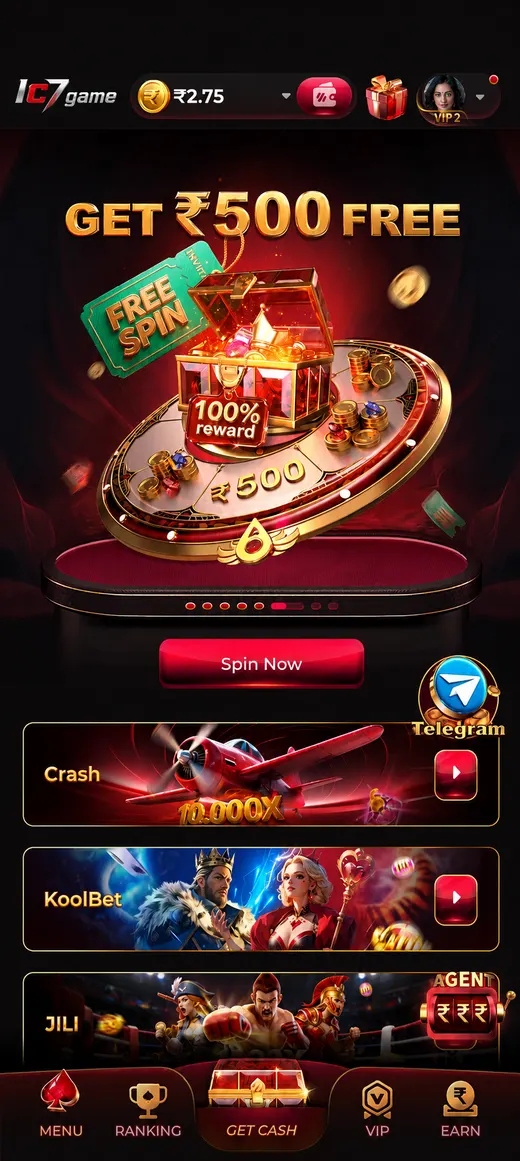
Download IC7 & Play Instantly

IC7 runs straight in your mobile browser — there is no app store listing, no APK file and no waiting for a 200 MB download to finish. Tap the link, sign in, and if you want an app-like icon on your phone, add IC7 to your home screen in about fifteen seconds.

No install required 18+ only

Two ways in

Instant Play vs the Home-Screen App

Both routes open exactly the same platform, the same account and the same 105+ games. The difference is purely how you get there and how it looks once you are in.

IC7 is built as a web platform first. Every slot reel, every live-dealer table and every Teen Patti hand is delivered through your browser, which means the moment you open Play Instantly in Browser you are already in the lobby — no download queue, no "installing…" progress bar, no 200 MB eating your storage before you have placed a single bet. This is the fastest possible path from curiosity to gameplay, and it is the one most players use on day one. It also means you can play from a friend's phone, a tablet, or a work laptop without leaving anything behind on the device.

The Add to Home Screen route is the same platform wearing an app's clothes. Your browser saves a shortcut with the IC7 icon onto your home screen, and when you tap it the site opens in a standalone window with no address bar and no browser tabs in the way. You get the full-screen feel of a native app, faster repeat launches because the interface files are already cached on your device, and a one-tap entry point that sits alongside your other apps. What you do not get is a system-level install: nothing is granted access to your contacts, your photos or your storage, because it is still the browser doing the work inside its own sandbox.

Neither route is available through Google Play or the Apple App Store, and we want to be straightforward about why. Both stores apply strict — and in India, effectively prohibitive — rules to real-money gaming applications, so platforms like IC7 are simply not listed there. That is not a workaround or a loophole; it is how virtually every real-money operator serving Indian players distributes its product. The browser and home-screen routes are therefore not a lesser option, they are the option, and they happen to be the safest one too: a web page cannot install a background service, cannot request device permissions you did not grant, and cannot silently persist after you close it.

Route 1

Play Instantly in Browser

What you get: the complete IC7 lobby — slots, live casino, card classics, fishing and instant games — loaded in Chrome, Safari, Edge or any modern browser, with your normal browser controls still visible.

Who it suits: first-time visitors, anyone trying IC7 out before committing, players on a borrowed or shared device, and desktop users who never wanted an app in the first place.

How long it takes: around five seconds. Tap the link and the lobby loads. Nothing is written to your home screen, nothing is queued in a download manager.

Route 2

Add IC7 to Your Home Screen

What you get: an IC7 icon among your apps, a full-screen standalone window with no address bar, faster launches from cache, and a single tap back into the lobby whenever you want it.

Who it suits: regular players who open IC7 several times a week and would rather not dig through browser bookmarks or retype a URL every single time.

How long it takes: roughly fifteen seconds, and it uses well under 20 MB of cached storage — a fraction of what a comparable native package would occupy.

Install guide

Add IC7 to Your Home Screen — Android

Works in Chrome, Samsung Internet, Brave and most Chromium-based Android browsers. The wording of the menu item changes slightly between browsers and versions, but the flow is always the same.

  1. Open the link

    Tap Play Instantly in Browser and let the IC7 lobby finish loading in Chrome.

  2. Open the menu

    Tap the three-dot ⋮ icon in the top-right corner of the browser toolbar.

  3. Add to home screen

    Choose "Add to Home screen" — or "Install app" if Chrome offers that instead.

  4. Confirm & launch

    Confirm the name, then tap the new IC7 icon to open it full-screen.

The detailed walk-through

  1. Open IC7 in Chrome. Tap the Play Instantly in Browser button anywhere on this page. If your phone offers to open the link in another app, choose Chrome — the home-screen install flow lives in the browser, and starting from a webview inside another app will hide the menu you need in the next step.
  2. Wait for the lobby to fully load. Give it three or four seconds until the game tiles and the bottom navigation are drawn. Chrome only offers the install option once it has read the site manifest, so acting too early is the single most common reason players report that the menu item "isn't there".
  3. Tap the three-dot ⋮ menu. It sits at the top-right of the Chrome toolbar, in line with the address bar. On Samsung Internet the equivalent control is the three-line menu at the bottom-right instead; on Brave it is the same ⋮ position as Chrome. A dropdown list of browser actions will open.
  4. Select "Add to Home screen" or "Install app". Chrome shows one or the other depending on your version — they do exactly the same thing here. A small dialog appears with the IC7 icon and an editable name. Leave the name as IC7 (or shorten it if you prefer) and tap Add or Install.
  5. Launch it from your home screen. The IC7 icon now sits with your other apps, and some launchers will also drop it into your app drawer. Tap it: IC7 opens in a clean, full-screen window with no address bar. Sign in once and your session will normally be remembered between launches.

Install guide

Add IC7 to Your Home Screen — iPhone & iPad

On iOS you must use Safari. Chrome, Firefox and Edge on iPhone cannot create a home-screen web app — Apple reserves that capability for Safari, so if the option is missing, the browser is almost always the reason.

  1. Open in Safari

    Load IC7 in Safari — not Chrome, not an in-app browser inside another app.

  2. Tap Share

    Tap the Share button — the square with an upward arrow in the toolbar.

  3. Add to Home Screen

    Scroll the share sheet and choose "Add to Home Screen".

  4. Name & launch

    Confirm the name, tap Add, then open IC7 from the new icon.

The detailed walk-through

  1. Open IC7 in Safari. Tap Play Instantly in Browser from Safari itself. If you arrived here from a Telegram or Instagram link, the page is probably running inside that app's built-in browser, which has no Add to Home Screen option at all — use the share icon to "Open in Safari" first, then continue.
  2. Tap the Share button. On modern iPhones the toolbar sits at the bottom of the screen and Share is the square icon with an arrow pointing up out of it. On iPad it usually sits at the top-right, next to the address bar. Tapping it slides up the iOS share sheet.
  3. Find "Add to Home Screen". Scroll down past the AirDrop row and the app icons to the list of actions — Copy, Add to Reading List, Add Bookmark, and so on. "Add to Home Screen" is in that list, marked with a plus symbol inside a square. Tap it.
  4. Name the shortcut. iOS shows a preview with the IC7 icon and an editable label. Short names look best under an icon, so "IC7" is ideal. Tap Add in the top-right corner and iOS will place the icon on the first free space on your home screen.
  5. Launch it. Tap the IC7 icon. Safari opens the platform in standalone mode — full screen, no address bar, no tab strip — and it behaves like any other app when you swipe between recent apps. Sign in once and iOS will typically keep you signed in for future sessions.

Install guide

Desktop — Windows & macOS

You do not need to install anything on a computer: IC7 plays perfectly in any modern browser window. But Chrome and Edge will happily give you a proper desktop window with a taskbar or Dock icon if you want one.

  1. Open IC7

    Load the platform in Chrome or Edge on Windows, macOS or Linux.

  2. Find the install icon

    Look for the small install icon at the right-hand end of the address bar.

  3. Click Install

    Click it and confirm. Alternatively use ⋮ → Cast, save and share → Install page as app.

  4. Pin it

    IC7 opens in its own window. Pin it to the taskbar or Dock for one-click access.

Desktop play is often the most comfortable way to experience live casino, because a larger screen makes it much easier to read the table, follow the dealer and track your bet history without squinting. IC7 is fully responsive, so the lobby reflows into a wide multi-column layout on a monitor and the live tables scale up to fill the space. A standard browser tab is perfectly sufficient — the install step buys you a dedicated window and an icon, nothing more.

If the install icon does not appear in your address bar, it usually means your browser is out of date, you are in a private or incognito window, or your organisation's policy blocks web-app installs. Any of those is fine: simply bookmark IC7 and keep playing in the tab. Firefox and Safari on desktop do not offer web-app installation either, and they run the platform just as well.

Compatibility

System Requirements

IC7 is built to run on the phones people in India actually own — not just flagships. Here is what you genuinely need.

IC7 minimum and recommended system requirements
Requirement Minimum Recommended
Android version Android 8.0 (Oreo) Android 10 or newer
iOS / iPadOS version iOS 13 iOS 15 or newer
Browser Any current Chrome, Safari or Edge Latest Chrome (Android) or Safari (iOS)
RAM 1 GB 2 GB or more
Storage No install — cache only Under 20 MB of cached data
Connection Stable 4G or Wi-Fi 4G / 5G or broadband for live casino

On mid-range Android phones — the Redmi, Realme, Poco and Samsung M-series handsets that make up most of our traffic — IC7 is designed to stay smooth rather than pretty at any cost. Slots, card games like Teen Patti and Andar Bahar, fishing arcades and instant titles all run in a lightweight rendering layer that keeps animations fluid on 2 GB of RAM. Live casino is the heaviest section because it is genuinely streaming video from a studio; if the feed stutters, closing background apps and switching from mobile data to Wi-Fi typically resolves it within a few seconds. We would rather tell you that plainly than pretend a 4G stream on a busy tower behaves like fibre.

Data usage is modest for most of the catalogue. Non-live games reuse cached artwork between rounds, so a long session of slots or cards typically costs a handful of megabytes rather than hundreds. Live tables are different: a real dealer feed usually consumes somewhere in the region of 40 to 80 MB per hour, depending on the quality your connection negotiates. The platform is also built to survive patchy signal — if your connection drops mid-round, the game state is held server-side, so reconnecting returns you to exactly where you were rather than losing the hand.

Screenshots

See IC7 Before You Play

A look at the lobby, the live tables and the cashier — captured from the same build that loads on your phone. Drag the gallery, use the arrows, or swipe.

IC7 app lobby showing live casino tables and featured game tiles
IC7 slots category page with a grid of jackpot and megaways titles
IC7 live dealer table in play with the betting panel open
IC7 Teen Patti card game screen showing the dealt hand and stake controls
IC7 Andar Bahar table with the joker card and side bet options
IC7 fishing arcade game with weapon selection and the shooting interface
IC7 instant crash game showing the rising multiplier curve and cash-out button
IC7 cashier screen with UPI, Paytm and net-banking deposit options
IC7 account dashboard showing balance, bonus progress and transaction history

Troubleshooting

When Something Doesn't Work

Six problems players actually report, and what genuinely fixes them.

Read this before you download anything

Never Install an "IC7 APK"

There is no official IC7 APK. Not on a file-sharing site, not on a "mod" blog, not in a Telegram channel that is not ours, not in a Google search result promising the "IC7 latest version 2026 download". If a website offers you an IC7 installer file, that file did not come from us, and you should assume it was built by somebody whose interests are directly opposed to yours. The only legitimate way onto the platform is the official link on this page, and the only legitimate "install" is the browser's own Add to Home Screen action described above.

The reason we are this blunt is that repackaged gaming APKs are one of the most reliable malware vectors aimed at Indian players right now. A tampered installer can ship a keylogger that harvests your UPI PIN, an overlay that fakes a login screen to capture your password, an SMS reader that intercepts the one-time passwords protecting your bank account, or a background process that quietly enrols your phone in a click-fraud network. Sideloading requires you to switch off Android's "install from unknown sources" protection — the exact safeguard designed to stop this — and once granted, the app operates with permissions a web page could never obtain.

The browser route sidesteps all of it. A web page cannot read your SMS, cannot draw over your banking app, cannot survive after you close it, and cannot demand system permissions you did not knowingly grant. That is not a compromise we are asking you to accept because app stores turned us away; it is genuinely the safer architecture. If you are ever unsure whether a link or a file is authentic, do not guess — ask us first on Telegram support, and always start your session from ic7world.in.

Five red flags that mean "close the tab"

  • A downloadable .apk, .xapk or .exe file. We never distribute one. Any site hosting an "IC7 app download" file is impersonating us, full stop.
  • Instructions to enable "Unknown sources" or "Install unknown apps". A legitimate web platform never needs you to lower your phone's security settings.
  • Promises no honest operator can make — "guaranteed winning hack", "unlimited bonus mod", "100% win prediction". These exist to make you careless before you install something.
  • A domain that is nearly, but not quite, ours. Look closely for extra hyphens, added words, or a different extension. Bookmark the real link and use only the bookmark.
  • Anyone asking for your password, OTP or UPI PIN — including someone claiming to be IC7 staff. Our support team will never ask for any of the three, in any channel, for any reason.

Straight answers to the questions people actually search

IC7 APK, IC7 Latest Version & IC7 Old App — Explained

A lot of players arrive here after searching for an IC7 APK download, the IC7 latest APK, or a way to get the IC7 old app back. Those searches all have the same real answer, and it is better news than it sounds.

Is there an IC7 APK download?

No — and you do not need one. The IC7 game app is a web app: it loads at ic7world.in and runs inside the browser you already have. There is no .apk file to fetch, no installer to run and no "unknown sources" toggle to switch off. When people talk about the "IC7 app", what they are describing is the home-screen shortcut created by the Add to Home Screen steps above, which gives you a launcher icon and a full-screen experience without installing a package. Any site advertising an IC7 APK download is not us.

What is the "IC7 latest APK", then?

It is a phrase used almost exclusively by sites that are not IC7. Because the platform is a web app, there is no version number for you to chase and no IC7 latest version to hunt down and re-install. You are always on the current build the moment you open the site — the same way you never think about which "version" of a news website you are reading. If you have added IC7 to your home screen, that icon loads the current platform too. You will never see an "update available" prompt, because there is nothing on your device that could go out of date.

I used the IC7 old app / an older version. What happened to it?

Nothing was taken away from you, and nothing needs to be recovered. If you previously used an IC7 old app or an older shortcut and it now looks different, that is simply the current platform loading — the interface, the game lobby and the payment screens are updated centrally rather than shipped to your phone. Your account, balance, game history and verification status are stored against your account, not against an app on your handset, so they follow you regardless of which device or browser you sign in from. There is no such thing as being "stuck on an old IC7 version".

Then why do "IC7 old apk" and "IC7 new version" sites exist?

Because those are high-intent searches, and impersonating a gaming brand at the moment someone is trying to install it is a profitable thing to do. A repackaged installer offered as an "IC7 old app download" or an "IC7 new update" is the same threat described in the section above: a file of unknown origin, asking you to disable the exact Android protection designed to stop it. If your shortcut has stopped working, do not go looking for a file — just open ic7world.in again, or ask IC7 support on Telegram.

How do I get IC7 new games, then?

They simply appear. New titles are added to the lobby centrally, so an IC7 new game shows up in your game library the next time you open it — no update, no re-install, no APK. The fastest way to hear about additions as they go live is the IC7 Telegram community, where new releases are posted the day they land.

What people search for versus how IC7 actually works
What people search for What actually applies at IC7
IC7 APK / IC7 game APK No APK exists. IC7 runs in the browser — nothing is installed on your phone.
IC7 latest APK / IC7 latest version You are always on the current build. There is no version to download or update.
IC7 old app / IC7 old version Nothing to restore. Your account, balance and history live with the account, not the device.
IC7 app download Use Add to Home Screen (steps above) for an app-like icon and a full-screen lobby.
IC7 new game / IC7 update New games appear in the lobby automatically. No install, no re-download.
IC7 login / IC7 register One account works across mobile and desktop. Sign in from any browser.

Next steps

Getting Started After You Add IC7

You are in. Four steps from an empty lobby to your first real hand — and the welcome bonus, if you choose to claim it.

  1. Register

    Create your account with your mobile number and a strong, unique password. It takes about a minute, and you can browse the lobby before you commit to anything.

  2. Verify

    Confirm the OTP sent to your phone. Completing verification early means withdrawals are not held up later — it is the single biggest cause of payout delays.

  3. Deposit

    Add funds via UPI, Paytm, PhonePe or net-banking, and opt in to the welcome bonus of up to ₹10,000 if you want it — subject to Terms, including wagering requirements.

  4. Play

    Pick a table, a slot or an instant game. Set a budget before your first spin, treat it as paid entertainment, and stop when it stops being fun.

FAQ

Download & Install Questions

Ready in Five Seconds

Open IC7 in your browser, add it to your home screen if you like it, and you are set. No app store, no APK, no waiting — just 105+ games and a welcome bonus of up to ₹10,000, subject to Terms & Conditions.

Play Responsibly · Regional Restrictions Apply

IC7 is intended strictly for adults aged 18 and above. Online gaming carries financial risk and should be treated as paid entertainment, never as a way to earn income. Set a budget before you play, take regular breaks, and stop when it stops being fun. Access is not permitted from the following states:

  • Andhra Pradesh
  • Telangana
  • Assam
  • Odisha
  • Nagaland
  • Sikkim